
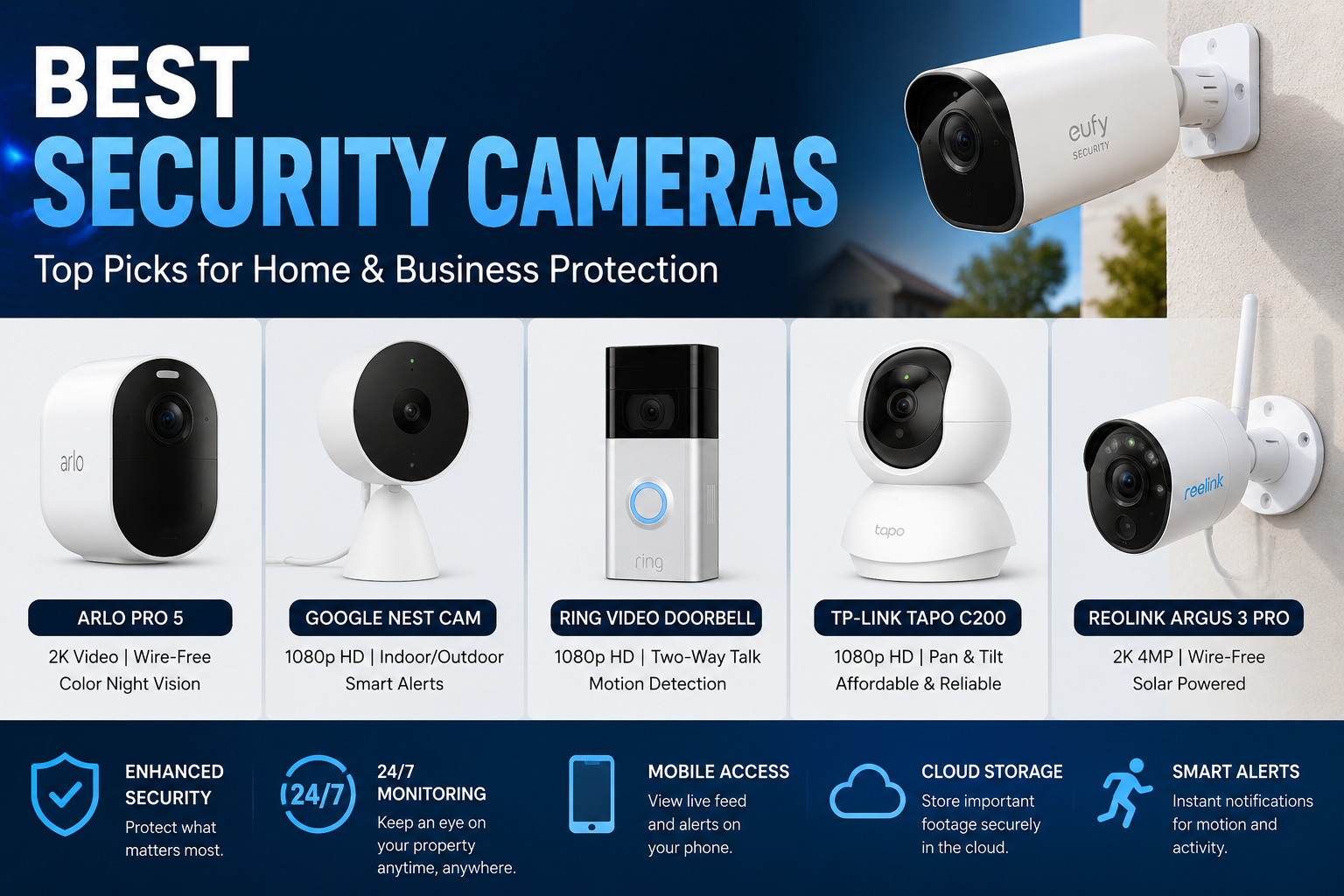
When it comes to protecting your home, family, office, or valuable property, choosing the best security cameras can make a major difference. A good security camera doesn’t just record video. It can help you see what’s happening around your property, receive alerts when something unusual happens, and provide useful evidence if an incident occurs.
Modern security cameras have become easier to install and use. Many models offer features such as high-definition video, night vision, motion detection, two-way audio, smart alerts, cloud storage, local storage, and mobile app access. However, with so many choices available, finding the right camera can feel confusing.
The best security cameras aren’t necessarily the most expensive ones. The right choice depends on where you want to install the camera, what you want it to monitor, your internet connection, storage needs, privacy preferences, and budget. This guide explains the most important features so you can make a smart and confident decision.
What Are Security Cameras?
Security cameras are devices designed to monitor and record activity in a specific area. They can be installed inside homes, outside buildings, at entrances, in garages, near driveways, or around commercial properties.
Many modern cameras connect to Wi-Fi and allow users to watch live video through a smartphone, tablet, or computer. Some cameras can also send notifications when they detect movement.
Traditional security cameras were often part of large wired systems. Today, consumers can choose from wired cameras, wireless cameras, battery-powered cameras, and smart cameras.
The best security cameras combine dependable video quality with useful security features and simple controls. A camera may have an impressive list of features, but if it’s difficult to install or unreliable during important moments, it may not be the right choice.
Why Security Cameras Are Important
A security camera can provide an extra layer of protection. While a camera can’t prevent every crime, its presence may discourage unwanted activity and can help homeowners understand what is happening around their property.
Cameras are also useful for everyday situations. For example, you may want to check whether a package has arrived, see who is standing at your front door, or monitor a pet while you’re away.
Some important benefits include:
- Monitoring entrances and outdoor areas
- Checking your property remotely
- Receiving movement alerts
- Recording important events
- Communicating through two-way audio
- Monitoring children or pets inside the home
- Checking garages, driveways, and side entrances
- Providing video evidence when needed
- Increasing awareness around your property
In other words, the best security cameras can offer both security and convenience.
Types of Security Cameras
Before buying a camera, it’s important to understand the main types available. Each design serves a different purpose.
Indoor Security Cameras
Indoor cameras are designed for rooms, hallways, offices, garages, and other protected areas. They’re often compact and easy to position on a shelf, table, wall, or ceiling.
Many indoor models include motion detection and two-way audio. Some can rotate or tilt to provide a wider view.
They’re useful for:
- Living rooms
- Entryways
- Baby rooms
- Home offices
- Garages
- Pet monitoring
If you’re monitoring an indoor space, there’s usually no reason to pay extra for heavy weather protection.
Outdoor Security Cameras
Outdoor cameras are built to handle conditions such as rain, dust, heat, and cold. They’re commonly installed near doors, driveways, gardens, fences, and garages.
A good outdoor camera should have suitable weather resistance and strong night vision. Its mounting position also matters because direct sunlight, reflections, and nearby lights can affect image quality.
The best security cameras for outdoor use should provide dependable performance during both daytime and nighttime.
Wired Security Cameras
Wired cameras receive power through an electrical connection. Some also use a network cable for data.
One major advantage is that you don’t normally have to worry about recharging a battery. Wired cameras can be a strong option for permanent installations.
However, installation may take more effort because cables need to be managed carefully.
Wireless Security Cameras
Wireless cameras often connect to your home network through Wi-Fi. They can be easier to install because you don’t need to run a data cable to every camera.
Still, wireless doesn’t always mean completely cable-free. Many wireless cameras still need a power source.
Before installation, check whether the camera will receive a strong Wi-Fi signal in its planned location.
Battery-Powered Cameras
Battery cameras can be placed in locations where running power cables is difficult. This makes them useful for renters, temporary installations, gates, sheds, and remote areas.
The main trade-off is battery life. Frequent motion events, cold weather, live viewing, and other features can increase battery use.
Important Features to Look For
Not every camera feature is equally important. When comparing the best security cameras, focus on features that actually match your needs.
Video Resolution
Resolution describes the amount of detail captured in an image. Higher resolution can make faces, clothing, vehicles, and other objects easier to identify.
However, resolution isn’t everything. A camera with excellent resolution can still produce poor footage if its lens, image processing, lighting, or placement is weak.
For most homes, a clear high-definition image is a good starting point.
Night Vision
Security problems don’t always happen during daylight. That’s why night vision is one of the most useful camera features.
Many cameras use infrared technology to produce black-and-white images in darkness. Some newer cameras can provide color footage when enough light is available.
When comparing cameras, consider:
- Night image clarity
- Night vision distance
- Infrared performance
- Bright lights near the camera
- Low-light color performance
A camera that looks excellent during the day but struggles at night may not provide complete protection.
Motion Detection
Motion detection allows a camera to identify movement and trigger an alert or recording.
Basic motion detection may react to almost anything that moves. More advanced systems can attempt to distinguish people, vehicles, animals, or other objects.
This can reduce unnecessary notifications. After all, nobody wants their phone buzzing every time a tree branch moves in the wind.
Person Detection
Person detection can be particularly useful for home security. Instead of simply telling you that movement occurred, a camera may identify that a person was detected.
This feature can make alerts more meaningful and reduce the number of unnecessary notifications.
Still, smart detection isn’t perfect. Lighting, camera angle, distance, and environmental conditions can affect results.
Two-Way Audio
Two-way audio allows you to listen to what’s happening near the camera and speak through its built-in speaker.
This can be useful when someone arrives at your door. You may be able to communicate with a visitor without opening the door.
It’s also handy for speaking to family members or telling a delivery person where to leave a package.
Field of View
Field of view determines how much of an area the camera can see.
A wider field of view can cover more space, but extremely wide views may make distant objects appear smaller.
Think about what you want to monitor before choosing the camera position. A narrow driveway may not need the same viewing angle as a large backyard.
Security Camera Storage Options
Video storage is an important part of choosing the best security cameras. A camera that records footage needs somewhere to save it.
Cloud Storage
Cloud storage sends recorded video to an online service. This allows you to access footage from different devices.
Cloud storage can be convenient, but some services require a subscription for advanced recording or detection features.
Before purchasing, check:
- Monthly or yearly subscription costs
- How long recordings are stored
- Whether important features require a subscription
- Whether clips can be downloaded
- What happens if the subscription ends
Local Storage
Some cameras allow footage to be saved locally using a memory card or another storage device.
The advantage is greater control over your recordings and potentially lower ongoing costs.
However, local storage can be lost or damaged if the camera or storage device is stolen. For important footage, having a backup strategy can be useful.
Hybrid Storage
Some systems support both local and cloud storage. This can provide flexibility and an additional backup option.
The best solution depends on how important your recordings are and how much control you want over your data.
Best Security Cameras for Different Needs
There isn’t one camera that is perfect for every person. Your ideal choice depends on your property and priorities.
| Need | Camera Type | Important Features |
|---|---|---|
| Front door | Video doorbell or outdoor camera | Motion detection, two-way audio, night vision |
| Backyard | Outdoor camera | Weather resistance, wide view, night vision |
| Indoor monitoring | Indoor camera | Clear video, motion detection, privacy controls |
| Large property | Multiple outdoor cameras | Wide coverage, reliable network connection |
| Remote location | Battery or solar-compatible camera | Long battery life, strong connectivity |
| Low-maintenance setup | Wired camera | Continuous power, stable connection |
| Privacy-focused setup | Local-storage camera | Local recording, privacy controls |
| Smart home | Smart security camera | App support, smart alerts, integration |
This comparison shows why selecting the best security cameras should start with your specific situation rather than simply choosing the camera with the longest feature list.
How to Choose the Best Security Cameras for Your Home
Choosing a camera becomes much easier when you follow a simple process.
Start With the Location
First, decide where the camera will go.
A camera installed outdoors needs different protection from one installed in a bedroom or office. Measure the area and think about what the camera needs to see.
Don’t place the camera too high if you need to identify faces. At the same time, don’t install it where someone can easily reach or damage it.
Think About Lighting
Look at the area during both day and night.
A camera facing directly toward a bright window may struggle with exposure. Likewise, a camera facing a strong outdoor light can produce glare.
Good placement is just as important as good hardware.
Check Your Internet Connection
Wi-Fi cameras depend on a stable network connection. If your camera is far from the router, the signal may be weak.
Before installing a wireless camera, check the Wi-Fi strength in the intended location.
If the signal is unreliable, consider improving your network coverage or using a wired camera.
Consider Power
Think about how the camera will receive electricity.
Battery cameras offer flexibility, but you’ll need to recharge them. Wired cameras offer continuous power but require cable installation.
For cameras in hard-to-reach areas, frequent battery charging can become a nuisance.
Review Storage Costs
Don’t look only at the camera’s purchase price. Consider the total cost of ownership.
A lower-priced camera may become more expensive over time if important features require a recurring subscription.
Privacy and Security Matter Too
A security camera protects your property, but the camera itself should also be protected.
Because smart cameras may connect to the internet, account security is extremely important.
Use strong, unique passwords and enable multi-factor authentication when available.
You should also keep camera software and apps updated. Manufacturers regularly release updates that can improve security, stability, and performance.
When installing indoor cameras, think carefully about privacy. Avoid placing cameras in highly private areas unless there’s a clear and appropriate reason.
Some cameras include privacy modes that disable recording or physically cover the lens. These features can provide extra peace of mind.
Camera Placement Tips
Even the best security cameras won’t perform well if they’re poorly positioned.
Here are some practical placement tips:
- Point cameras toward important entry points.
- Avoid placing them where strong sunlight creates glare.
- Keep outdoor cameras high enough to reduce tampering.
- Make sure the camera can see faces clearly.
- Avoid unnecessary views into neighbors’ private spaces.
- Check the nighttime view before finalizing installation.
- Protect cables from easy access.
- Keep lenses clean.
- Make sure wireless cameras have a strong connection.
It’s worth taking a little extra time during installation. A carefully positioned ordinary camera can sometimes be more useful than an expensive camera aimed at the wrong location.
Wired vs Wireless Security Cameras
Both wired and wireless cameras have advantages.
Wired systems are usually attractive for permanent installations where reliable power and connectivity are important. They’re particularly useful when you want cameras running continuously.
Wireless cameras can be easier to install and move. They’re convenient for renters or locations where running cables isn’t practical.
However, wireless cameras depend more heavily on network quality and, in many cases, battery management.
The best security cameras are therefore different for each home. Choose the connection type that fits your property instead of simply following trends.
Common Mistakes to Avoid
Buying a security camera without considering the installation environment can lead to disappointment.
One common mistake is focusing only on resolution. A high-resolution camera isn’t automatically better in every situation.
Another mistake is ignoring nighttime performance. Security monitoring needs to work after dark, too.
People also sometimes forget about storage costs. A camera may look affordable at first, but subscription charges can increase the long-term cost.
Other mistakes include:
- Installing too few cameras
- Ignoring Wi-Fi strength
- Choosing the wrong viewing angle
- Forgetting about weather resistance
- Mounting cameras too low
- Ignoring privacy
- Failing to update camera software
- Not testing notifications
- Forgetting to clean outdoor lenses
Avoiding these problems can make your security system much more effective.
Smart Security Camera Features
Smart cameras are becoming increasingly useful because they can analyze activity and provide more meaningful alerts.
Depending on the model, smart features may include:
- Person detection
- Vehicle detection
- Animal detection
- Activity zones
- Custom alerts
- Familiar-face recognition
- Automated recording
- Smart home integration
These features can reduce the amount of time you spend watching unnecessary footage.
For example, if your camera can distinguish between a person and an animal, you may receive fewer irrelevant notifications.
However, smart detection should be viewed as an aid rather than a guarantee. No automated system is perfect in every situation.
How Much Should You Spend?
The right budget depends on your goals.
A basic camera may be enough for monitoring a small indoor room. Outdoor cameras with stronger weather protection and advanced detection may cost more.
If you’re protecting a large property, remember that you may need multiple cameras. Buying one premium camera isn’t always better than creating balanced coverage with several suitable cameras.
When comparing prices, consider:
- Camera cost
- Installation cost
- Storage cost
- Subscription fees
- Replacement batteries
- Additional accessories
- Network upgrades
Looking at the complete cost will help you make a more informed decision.
Maintenance Tips for Security Cameras
Once installed, cameras still need basic care.
Outdoor cameras can collect dust, dirt, rain spots, and insects. A dirty lens can reduce image quality.
Check your cameras regularly and gently clean the lens according to the manufacturer’s instructions.
Also check:
- Battery levels
- Wi-Fi connection
- Recording status
- Notification settings
- Software updates
- Storage capacity
- Mounting stability
Testing your system from time to time is a smart habit. You don’t want to discover that a camera stopped recording only after an important event.
Are Security Cameras Worth It?
For many homeowners and businesses, security cameras are a worthwhile investment because they provide visibility and awareness.
They can help you monitor entrances, watch deliveries, check outdoor areas, and understand what happened during an event.
However, cameras should be part of a wider security approach. Good locks, outdoor lighting, secure doors and windows, alarms, and sensible privacy practices can all work together.
The goal isn’t to create a complicated system. It’s to create a practical security setup that you can actually manage.
Best Security Cameras Buying Checklist
Before purchasing, use this simple checklist:
- Is the camera designed for indoor or outdoor use?
- Does it provide clear daytime video?
- Does it provide useful nighttime video?
- Is the viewing angle suitable?
- Does it have motion detection?
- Are smart alerts important to you?
- Does it support two-way audio if needed?
- Does it use wired, wireless, or battery power?
- Is your Wi-Fi strong enough?
- Does it support cloud or local storage?
- Are there subscription fees?
- Does it offer useful privacy controls?
- Is the camera easy to update and maintain?
- Does it fit your long-term budget?
If you can answer these questions before buying, you’ll have a much better chance of selecting the right product.
Frequently Asked Questions About Best Security Cameras
What should I look for in the best security cameras?
Look for clear video, reliable night vision, useful motion detection, suitable weather protection for outdoor use, dependable connectivity, secure storage, and strong privacy controls. The most important features depend on where you plan to install the camera.
Are wireless security cameras reliable?
Wireless cameras can be reliable when they have a strong Wi-Fi connection and suitable power. Before installing one, check the wireless signal at the planned location.
Do security cameras work without Wi-Fi?
Some cameras can record locally without an internet connection, depending on their design. However, many smart features and remote viewing functions require internet access.
Are outdoor security cameras waterproof?
Outdoor cameras are generally designed with weather resistance, but you should always check the manufacturer’s stated protection rating. Weather resistance levels can vary considerably.
Is cloud storage better than local storage?
Neither option is automatically better. Cloud storage makes remote access convenient, while local storage can provide greater control and reduce recurring subscription costs. Some systems offer both.
Do security cameras record all the time?
Some cameras can record continuously, while others primarily record when motion or another event is detected. Continuous recording usually requires suitable power and storage.
Can security cameras help prevent crime?
Visible cameras may discourage some unwanted activity, although no camera can guarantee that crime won’t occur. Their major benefit is providing monitoring, alerts, and potentially useful recorded evidence.
How many cameras does a home need?
It depends on the size and layout of the property. Start with important areas such as main entrances, driveways, garages, and other vulnerable access points. Avoid adding cameras simply for the sake of having more devices.
Final Thoughts on Best Security Cameras
Choosing the right security system doesn’t have to be complicated. Start by identifying the areas you want to monitor, then consider video quality, night vision, motion detection, power, connectivity, storage, privacy, and overall cost.
Remember that expensive doesn’t always mean better. A camera that matches your environment and security needs can be far more useful than a feature-packed model that doesn’t fit your property.
Take your time, compare the important features, and think about long-term ownership rather than just the initial price. With thoughtful planning and proper placement, the best security cameras can provide valuable visibility, convenience, and peace of mind for your home or business.
Ultimately, the best security cameras are the ones that reliably cover the places that matter most, provide clear information when you need it, protect your recordings and privacy, and remain simple enough for you to use every day.
Never miss a headline follow All News Here for fresh news, updates & insights every day.